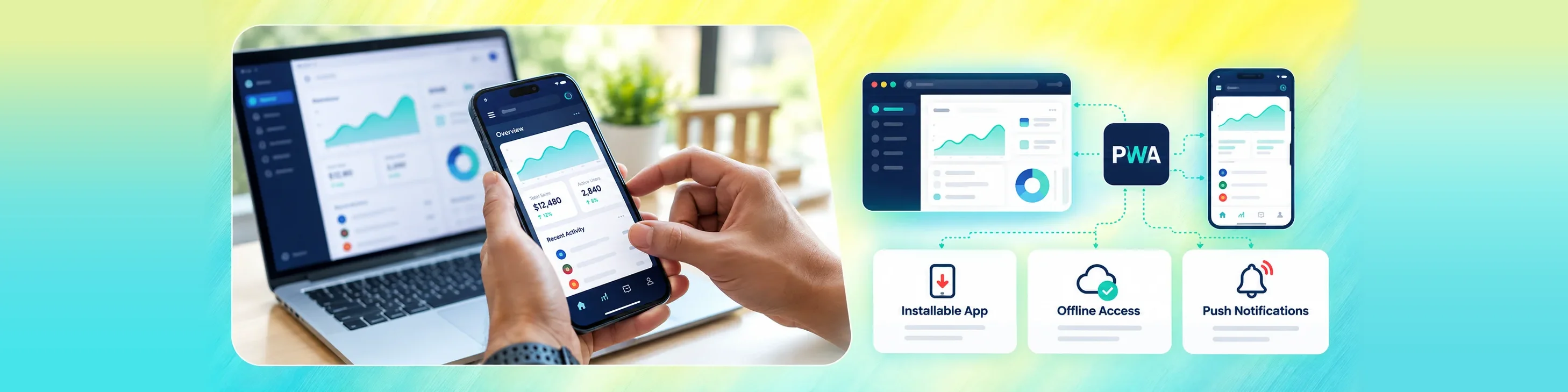
Deliver Fast, Installable, and App-Like Web Experiences
PineSucceed Technologies Pvt Ltd designs and develops Progressive
Web Applications that combine the accessibility of the web with
app-like performance, installation, offline access, and user
engagement features.
From strategy and interface design to service workers, caching,
notifications, backend integration, testing, deployment, and
support, we build reliable PWAs that work across supported devices
and browsers.
Our Capabilities
PWA Development Services
We Offer
Explore our services
01 /
Consulting
PWA Consulting and Strategy
We help businesses determine whether a Progressive Web App is
suitable for their users, workflows, technical requirements,
distribution goals, and budget.
Our PWA consulting includes
Business and product requirement analysis
Audience, device, and browser assessment
PWA feasibility evaluation
Feature and capability planning
Architecture and technology recommendations
Performance and offline strategy
Implementation roadmap and risk planning
The Outcome
Create an App-Like Experience
with Web Reach
Web Accessibility with Application Capabilities
PWAs can be accessed through a URL and installed on supported
devices, helping businesses reduce distribution friction while
providing selected application features.
With PineSucceed, you get:
Broad browser and device reach
Installable user experiences
Fast loading and responsive interfaces
Offline and low-connectivity support
Push notification capabilities
A maintainable web-based architecture
Business-First PWA Development
We recommend PWA development when it supports the target
users, required features, distribution model, technical
environment, and long-term product strategy.
Key questions we help answer
Is a PWA suitable for the product and audience?
Which browsers and devices must be supported?
What should remain available offline?
Which actions require synchronization?
Which native capabilities are required?
How will users install and return to the application?
How should performance and engagement be measured?
Our Approach
Our PWA Development Process
Step 01
Discovery and Requirement Analysis
Step 01 / 08
Discovery and Requirement Analysis
We begin by understanding your business, users, product
goals, features, content, workflows, target devices,
browsers, integrations, and success measures.
Key activities:
Stakeholder discussions
Business and product requirement analysis
Audience and device assessment
Feature and workflow mapping
Existing website or application review
Integration and infrastructure assessment
Success criteria definition
Step 02
PWA Feasibility and Strategy
Step 02 / 08
PWA Feasibility and Strategy
We evaluate required browser capabilities, offline needs,
native features, installation behavior, notifications,
performance, and distribution goals.
Assessment areas include:
PWA suitability
Target browser and platform support
Service worker and caching requirements
Offline and synchronization scope
Push notification support
Native capability limitations
Delivery roadmap and risk planning
Step 03
Application Architecture and Planning
Step 03 / 08
Application Architecture and Planning
Our team defines the frontend, backend, data, caching,
synchronization, security, integration, deployment, and
monitoring architecture.
Planning deliverables include:
PWA solution architecture
Frontend framework and component strategy
Manifest and service worker design
Backend and API architecture
Offline data and synchronization model
Security and access model
Testing and deployment strategy
Step 04
UI and UX Design
Step 04 / 08
UI and UX Design
We create responsive user journeys, wireframes, prototypes,
and interfaces designed for mobile, tablet, and desktop
interactions.
Design activities include:
User flows and information architecture
Mobile-first wireframes
Interactive prototypes
Responsive interface design
Reusable design system
Install and offline-state experiences
Accessibility and usability review
Step 05
PWA Development
Step 05 / 08
PWA Development
PineSucceed develops the frontend application, service
worker, backend services, APIs, database, integrations,
installability features, and offline behavior.
Development activities include:
Responsive frontend development
Web app manifest implementation
Service worker and caching development
Backend and API development
Offline storage and synchronization
Push notification integration
Analytics, logging, and monitoring
Step 06
Testing and Quality Assurance
Step 06 / 08
Testing and Quality Assurance
We validate the PWA across supported browsers, devices,
network conditions, user roles, installation states,
integrations, and workflows.
Validation includes:
Functional and regression testing
Responsive and cross-browser testing
Installability testing
Offline, cache, and update testing
Synchronization and conflict testing
Performance, security, and accessibility testing
User acceptance testing
Step 07
Deployment and Launch
Step 07 / 08
Deployment and Launch
We prepare the production environment, deploy the PWA and
backend services, configure HTTPS and caching, and monitor
the release.
Launch activities include:
Production environment setup
Domain, HTTPS, CDN, and caching configuration
CI/CD and release setup
Manifest and service worker validation
Analytics and monitoring setup
Release and rollback planning
Post-launch stabilization
Step 08
Maintenance and Continuous Improvement
Step 08 / 08
Maintenance and Continuous Improvement
After launch, we monitor performance and usage, maintain
browser compatibility, manage service worker updates, and
deliver improvements.
Ongoing support includes:
Bug fixing and incident support
Browser and platform compatibility updates
Framework and dependency upgrades
Performance and security optimization
Caching and service worker improvements
User feedback analysis
Feature enhancement
Use Cases
PWA Solutions for Different Business Goals
Reach mobile and desktop users
Responsive application, installability, shared web delivery,
and broad browser access
Reduce app download friction
URL-based access, home-screen installation, and lightweight
updates
Support weak connectivity
Offline content, local storage, queued actions, and
synchronization
Create an app-like web product
Application shell, responsive UI, service workers, and push
notifications
Modernize an existing website
Frontend upgrade, PWA features, performance, security, and
responsive redesign
Improve mobile commerce
Fast catalog, installability, checkout, notifications,
caching, and integrations
Support field teams
Offline workflows, forms, local data, background sync, and
enterprise integration
Improve repeat engagement
Install prompts, notifications, fast return visits, and
personalized experiences
Deliver one maintainable experience
Shared web codebase, APIs, reusable components, and
centralized releases
Tools & Technologies
Technologies and Platforms We Work With
Frontend
React, Next.js, Vue, modern JavaScript, TypeScript, HTML,
and CSS
PWA Capabilities
Web app manifests, service workers, Cache API, IndexedDB,
web push, and background sync
Backend
Node.js, Python, PHP, REST APIs, GraphQL, and scalable
service architectures
Databases
PostgreSQL, MySQL, MongoDB, cloud databases, and
browser-based local storage
Cloud
AWS, Microsoft Azure, Google Cloud, Firebase, and managed
web services
Integrations
Payments, maps, identity, notifications, analytics, CRM,
ERP, and third-party APIs
Performance
CDN, caching, image optimization, code splitting, Core Web
Vitals, and monitoring
Testing
Unit, integration, browser, responsive, offline,
performance, security, and accessibility testing
We assess whether a PWA matches your audience and
requirements and explain any platform limitations before
development begins.
Every PWA is designed around your users, business
workflows, offline needs, integrations, security, and
product roadmap.
Our team combines responsive frontend development with
backend services, APIs, databases, cloud infrastructure,
DevOps, security, and integration expertise.
We design caching, code delivery, network behavior, APIs,
media, service workers, and monitoring to create fast and
resilient experiences.
PineSucceed can implement installation, offline access,
synchronization, push notifications, and return-user
experiences where supported and appropriate.
We plan authentication, permissions, API security, local
data handling, cloud infrastructure, monitoring, and
scaling from the beginning.
Our team can support consulting, UX design, architecture,
development, testing, migration, deployment, monitoring,
maintenance, and continuous improvement.
Beyond launch, PineSucceed can maintain browser
compatibility, update frameworks and service workers,
improve performance, and develop new features.
The Value
Benefits of PWA Development
PWA development helps businesses deliver responsive and app-like
experiences through the web while adding selected capabilities for
installation, offline use, performance, and engagement.
Easy access
Direct access through a web link
Installable experiences on supported devices
No mandatory app-store download
Fast and offline
Responsive mobile and desktop access
Fast repeat visits through caching
Offline and low-connectivity capabilities
Simple delivery
Push notifications on supported platforms
Centralized web deployment and updates
Shared web technology and codebase
Wider reach
Improved reach and reduced distribution friction
Search visibility for public content
Scalable and maintainable application delivery
Let’s Talk
Ready to Build a Progressive Web App?
Whether you want to modernize an existing website, create an
installable digital product, support offline workflows, or
launch a mobile-first application without separate native apps,
our team can help.
FAQs
Frequently Asked Questions
A Progressive Web App is a web application enhanced with
capabilities such as installation, service worker caching,
offline access, responsive interfaces, and push notifications
where supported.
A PWA uses modern web capabilities to provide a more app-like
experience. It can support installation, offline behavior,
faster repeat loading, background processing, and notifications,
depending on the browser and platform.
A PWA is delivered through web technologies and accessed by URL,
while a native app is built for a specific operating system and
distributed through an app store. Native apps may offer broader
access to platform-specific capabilities, while PWAs can
simplify reach and updates.
Yes. A PWA can cache selected interfaces and content, store data
locally, queue actions, and synchronize when connectivity
returns. The exact offline scope depends on the application's
data and workflows.
Yes, on supported browsers and operating systems. Users can add
the PWA to a home screen or application menu and launch it in an
app-like window.
PWAs can support web push notifications on compatible browsers
and platforms. Availability and behavior vary, so we assess the
target audience and platform requirements before implementation.
A PWA is primarily distributed through the web. In some cases it
may be packaged for selected stores, but availability and
requirements differ by platform. We recommend the best
distribution approach for the project.
Yes. We can assess the current website, improve responsive
behavior and performance, add a web app manifest and service
worker, define caching and offline features, and update the
backend where necessary.
Yes. Existing web applications can often be enhanced with
installability, service workers, caching, offline storage,
synchronization, notifications, and performance improvements.
PWAs can be effective for commerce because they support fast
mobile experiences, installation, repeat visits, caching,
notifications, and centralized updates. The best approach
depends on checkout, payment, integration, and platform
requirements.
Public PWA content can be search-friendly when the application
uses appropriate rendering, crawlable pages, metadata, URLs,
structured data, performance practices, and technical SEO
controls.
We use HTTPS, secure authentication, role-based access,
protected APIs, input validation, session and token controls,
safe local data handling, dependency management, monitoring, and
security testing.
Yes. Ongoing support can include bug fixing, browser
compatibility, framework and dependency updates, service worker
management, performance optimization, security improvements,
monitoring, and feature development.
The timeline depends on product scope, design, backend services,
integrations, offline requirements, notifications, migration,
testing, and deployment. A focused PWA may take several weeks,
while a larger application is normally delivered in phases.
Explore more
Related services and industries
Request a Proposal
Tell us about your project. Our team will get back to you.
✨
Thank you! Your request has been received.
Our sales team will review your requirements and follow up within 24 business hours.